Download TuneBit
For Windows 10 (1809 or later) and Windows 11, on x64. Current release: 1.0.5. Two builds, both with every tool: install it, or run it off a stick.
This installs TuneBit and nothing else
No toolbar, no antivirus trial, no third-party offer with the box already ticked. It may fetch Microsoft’s .NET 10 Desktop Runtime, which TuneBit needs to start — and the portable build carries its own copy, so it fetches nothing at all. The app sends us no telemetry either: the full promise, and how to check it.
It takes a restore point before it changes Windows
Automatically, switched on out of the box, and it keeps its own copy of every registry key, driver and system file it edits. If a change was the wrong one, putting it back is a handful of clicks: how to undo anything TuneBit does.
Installer
The normal way to install TuneBit on a PC you own. Adds a Start menu entry and uninstalls cleanly.
- Installs to Program Files and registers an uninstaller.
- Pulls in the .NET 10 Desktop Runtime if the PC does not already have it.
- The license binds to the machine — one activation per PC.
TuneBit-Setup-1.0.5.exe
SHA-256 — this file’s fingerprint. It should match yours exactly:
To check: open PowerShell from the Start menu, type Get-FileHash and a
space, drag your downloaded file onto the window, then press Enter.
Rather not take our word for it? Scan this download on VirusTotal — it fetches the file from the link above and asks dozens of security vendors about it, there and then. The scan runs on VirusTotal’s machines, so nothing leaves yours.
Portable
A single file that runs where you put it. Nothing is installed and nothing is left behind on the PC.
- One exe. Copy it to a USB stick and run it — no install, no uninstall.
- The .NET 10 runtime is built in, so it runs on a PC that has never seen it.
- On a Technician license it binds to the stick, not to the PC you plug it into.
TuneBit-Portable-1.0.5.exe
SHA-256 — this file’s fingerprint. It should match yours exactly:
To check: open PowerShell from the Start menu, type Get-FileHash and a
space, drag your downloaded file onto the window, then press Enter.
Rather not take our word for it? Scan this download on VirusTotal — it fetches the file from the link above and asks dozens of security vendors about it, there and then. The scan runs on VirusTotal’s machines, so nothing leaves yours.
Before you start
- The installer may tell you a piece of Microsoft software called the .NET 10 Desktop Runtime is missing, and offer to fetch it. Let it — it is a free Microsoft component, it takes a minute, and TuneBit needs it. The portable build already carries its own copy, which is why that download is so much bigger.
- On Windows 10 the TuneBit window has square corners and a solid background instead of the softly translucent one you see in the screenshots. Only the look differs; every tool works the same.
Windows asks you two questions before it will run TuneBit
Both are Windows being careful with a program you have only just downloaded. Neither one means there is anything wrong with the file. Here is what each one looks like and exactly what to click.
Question 1 — “Windows protected your PC”
This box appears the first time you open the file you downloaded. Notice that it has no Run button on it — that is the part that catches people out. You have to click More info to make one appear.
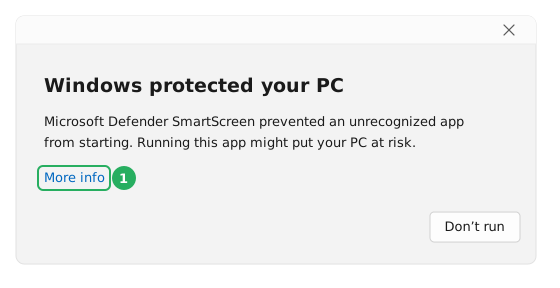
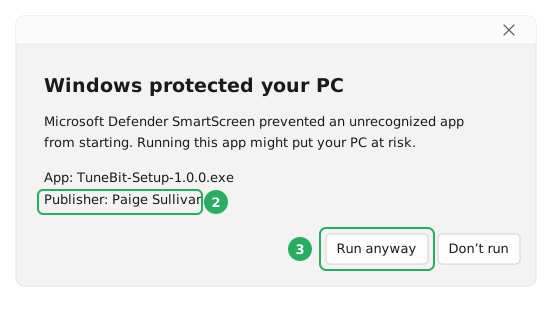
- Click More info. Two extra lines and a second button appear.
- Read the Publisher line. It must say Paige Sullivan.
- Click Run anyway. That is it — TuneBit opens.
Why does the publisher say a person’s name?
Because that is whose name is on the certificate. TuneBit is published by Sullivan Technology, and the certificate that signs every build is issued to its owner, Paige Sullivan, personally. Windows shows you the name on the certificate rather than the trading name, so the two look different. Both are us.
Why am I warned at all if TuneBit is signed?
The box comes from Microsoft Defender SmartScreen. Alongside the signature, SmartScreen counts how many people worldwide have already run this exact file. A release that is a few days old has not been run by many people yet, so it does not clear that bar and the warning appears anyway. The count builds on its own as more people download it, and the warning stops appearing.
When you should not click Run anyway
- The publisher line says Unknown publisher, or any name other than Paige Sullivan.
- You got the file from somewhere other than this website.
- Its SHA-256 does not match the one printed above.
Question 2 — “Do you want to allow this app to make changes to your device?”
The screen dims and this box appears. It is the standard Windows permission prompt, and you will see it every time you start TuneBit — not just the first time.
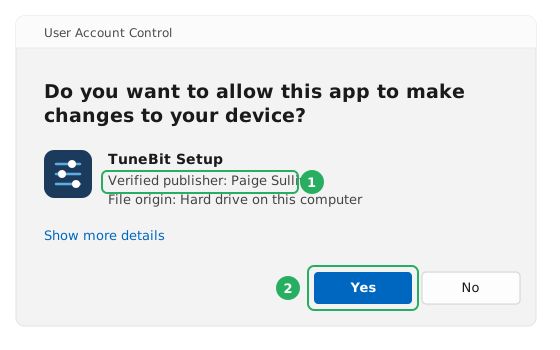
- Check that Verified publisher says Paige Sullivan.
- Click Yes. TuneBit will not start if you click No.
Why does TuneBit need this permission?
Because the repairs it makes are to Windows itself, and Windows does not let an ordinary program touch those parts. Repairing Windows Update, clearing the DNS cache, running the SFC and DISM system-file checks, emptying the system temp folders and changing which services start — every one of those needs administrator rights. There is no reduced mode that skips the prompt; without it TuneBit has nothing it is allowed to fix.
Nothing happens when I open TuneBit and I never see this box
That means the Windows account you are signed in to is not an administrator, so Windows refuses the request instead of asking you about it. Right-click the TuneBit file, choose Run as administrator and enter an administrator password if one is asked for — or sign in on an administrator account and start it there.
Activating your license
Open Settings → License in TuneBit and paste the code from your dashboard. Codes are verified on the machine, so activation works offline; TuneBit then confirms the license with us every three days and keeps running normally in between, whether or not the machine has a connection.
A code is a long line of letters and numbers, and it is meant to be copied rather than read or typed. The activation guide walks through it a click at a time, with screenshots of every screen and plain-English answers for each message TuneBit can show you if a code is refused.
Running the portable build from a USB stick on a Technician license? Register the stick's hardware ID in your dashboard and TuneBit picks the license up automatically the next time it starts.