Will it break my computer?
No. Before TuneBit changes anything it saves a copy of what it is about to change. Windows also takes a snapshot it can go back to. If you do not like something it did, it can be put back the way it was.
Slow to start. Always out of room. Nagging you about updates that never finish. TuneBit is a program that sorts all of that out for you. You press one button and go and pour yourself a coffee.
Free to download and free to look. $19.97 a year if you keep it.
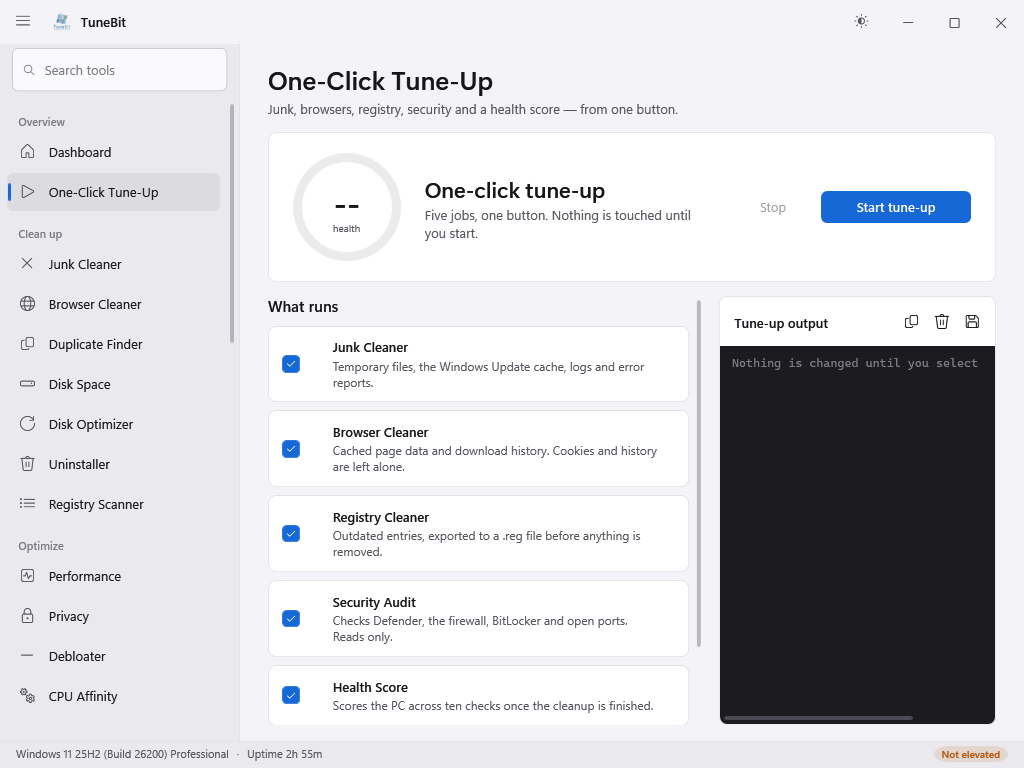
TuneBit has 34 tools inside it. You do not have to learn a single one of them. There is a page with one button on it, and the button does five jobs in a row.
The download is free. You do not type in a card and you do not sign up for anything. It takes about a minute.
Open TuneBit and click One-Click Tune-Up down the left-hand side. Then press the blue button. Now go and pour yourself a coffee. It takes about ten minutes and it does not need you.
When it finishes you get a score out of 100 and a short line for each thing it found. Written in normal words. If you want it to fix something else, there is a button next to it.
Here is the same job, both ways.
every time, for a typical clean-up
for a whole year
We should be straight with you about one thing. If your computer will not switch on, or the screen has gone, no program can help you and you need a person. TuneBit is for the computer that works, but works badly.
These are the questions we actually get asked, and these are the answers.
No. Before TuneBit changes anything it saves a copy of what it is about to change. Windows also takes a snapshot it can go back to. If you do not like something it did, it can be put back the way it was.
No. There is nothing to set up and nothing to type. You do not have to know which of the tools you need, because the one button uses the right ones for you.
No. We do not keep your card number. You buy one year. When the year is up, nothing happens. There is no automatic renewal, nothing to cancel and nobody to call.
No. Everything is unlocked from the first day. There is no better version for us to keep interrupting you about, and no advertising anywhere in it.
No. TuneBit does not send us anything about you or your computer. What it finds out is shown to you on your screen and it stays there.
Tell us within 30 days and we give you your money back. You can also run the whole thing before you pay us anything, so you can see what it finds on your computer first.
People do try this on, and they try it on older people most of all. So here is exactly what we will never do, in writing, so you can hold us to it.
If anybody does any of those things and says they are from TuneBit, it is not us. Hang up. Then, if you would like to check, write to us through our contact page and a person will answer you.
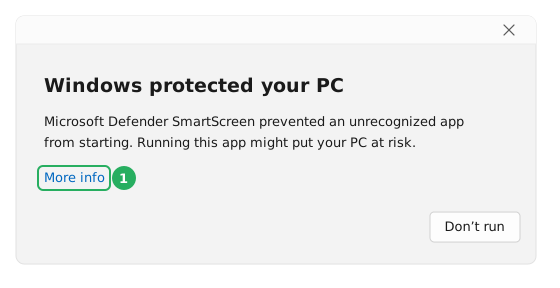
Both are Windows being careful about a program you have only just downloaded. Neither one means anything is wrong. Here is what to click.
This box has no Run button on it, which is what catches most people out. You have to click the small words More info to make one appear.
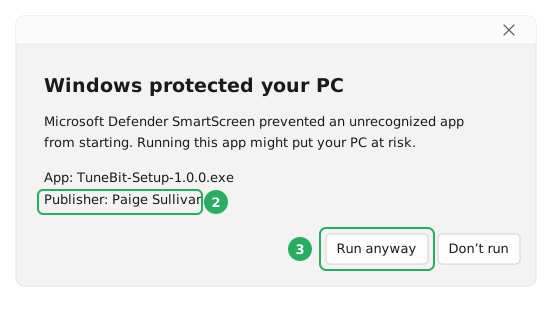
The screen goes dim and a box appears asking whether to let TuneBit make changes to your device. Click Yes. TuneBit has to ask, because fixing Windows means changing Windows. You will see this every time you open it, not just the first time.
If you would like the longer version of this, with both boxes drawn out step by step and how to check the file is genuine, it is on the download page.
Quite a lot of people do. One license covers 5 computers, so one purchase can quietly cover your parents, your sister and yourself. Here is the shortest way to do it.
Worth knowing: nothing renews on its own, so you will not find yourself paying for this quietly for the next nine years.
One year. Up to 5 computers. Everything unlocked.
That is $19.97 once, not $19.97 a month. Nothing renews by itself and there is nothing to cancel.
You do not have to decide today. Download it, press the button, see what it finds on your computer. If you buy it and it was not worth it, tell us within 30 days and we give you your money back.
This page is the short version. Everything on it is true, and there is a great deal more underneath it.